How to Obtain SDK Version
Obtain SDK Version with SDK
- Unity
- Unreal Engine
- If iOS plugin is included, in the path
Plugins\iOS\INTLSDK\INTLCore\INTLCore.framework\Headers\INTLCore.h, openINTLCore.h. - Find
#define INTLCore_Version_Stringwhich indicates the SDK version.
- In the path
/Plugins/INTLSDK/Source/INTLCore/Libs/includeinside the downloaded SDK, openINTLCore.h. - Find
#define INTLCore_Version_Stringwhich indicates the SDK version.

Obtain SDK Version with INTL log
To obtain INTL log, see How to obtain INTL log.
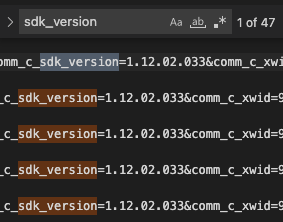
In INTL log, search the string containing sdk_version which includes the SDK version.
Obtain SDK Version with Android plugin
- Unity
- Unreal Engine
- In the path
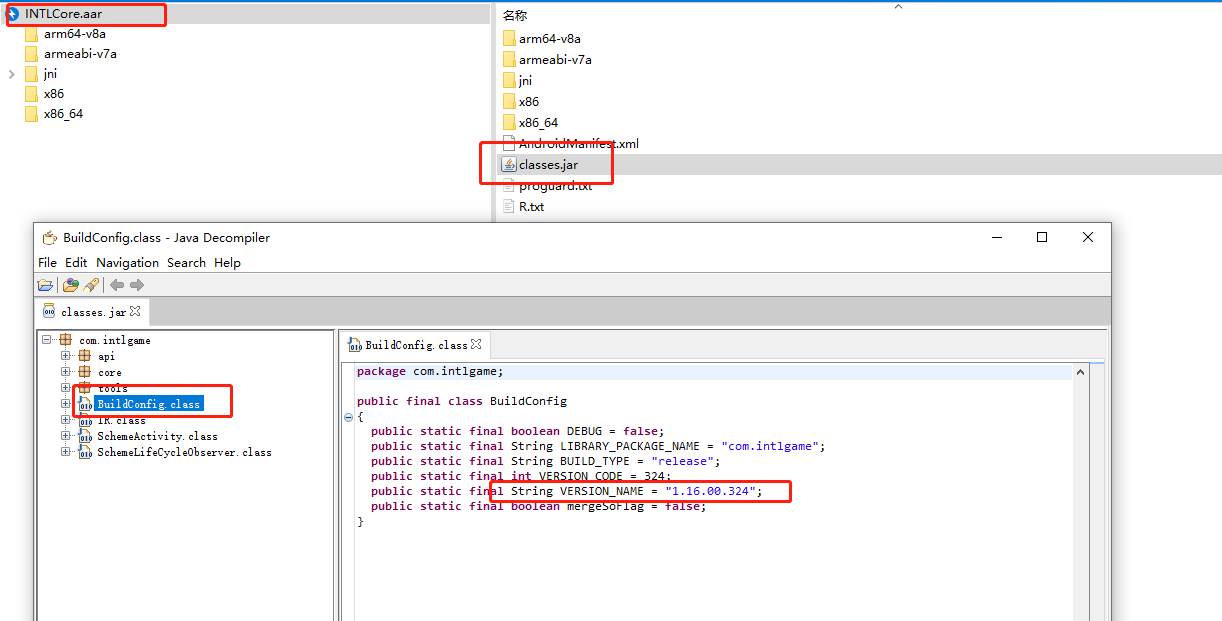
Plugins\Android\INTLCore.aar, extract the Player Network SDK core packageINTLCore.aar. - From the Player Network SDK core package, extract
Classes.jar. - Open
BuildConfig.classand locate theVERSION_NAMEstring which indicates the version number.
- In the path
INTLSDK\Source\INTLCore\Libs\Android\libs, extract the Player Network SDK core packageINTLCore.aar. - From the Player Network SDK core package, extract
Classes.jar. - Open
BuildConfig.classand locate theVERSION_NAMEstring which indicates the version number.