ReportLoginStep(obsolete, not recommended for use)
AndroidiOSWindows
If you were looking for the method for use with Unreal Engine, see ReportLoginStep for Unreal Engine SDK.
If you were looking for the method for use with Unreal Engine, see ReportLoginStep for Unreal Engine SDK.
Reports the data of the Login event to calculate the conversion rate for funnel analysis.
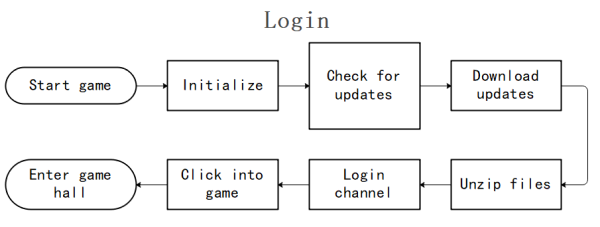
The Login funnel contains the following steps:
0: start game > 1: initialize > 2: check for updates > 3: download updates > 4: unzip files > 5: login channel > 6: click to enter game > 7: enter game lobby
Function definition
public static void ReportLoginStep(uint step, string stepName, bool result, int errorCode = 0, string extraJson = "{}");
Input parameters
| Parameter | Type | Description |
|---|---|---|
| step | uint | Step ID Counting from 0 |
| stepName | string | Step Name |
| result | bool | Step result true: success false:fail |
| errorCode | int | Error code result=true, errorCode=0 result=false, errorCode is custom error code |
| extraJson | string | The extended field JSON string |
Code sample
INTLAPI.ReportLoginStep(0, "start game", true, 0, "{}");                //0: start game
INTLAPI.ReportLoginStep(1, "initialize", true, 0, "{}");                //1: initialize
INTLAPI.ReportLoginStep(2, "check for updates", true, 0, "{}");         //2: check for updates
INTLAPI.ReportLoginStep(3, "download updates", true, 0, "{}");          //3: download updates
INTLAPI.ReportLoginStep(4, "unzip files", true, 0, "{}");               //4: unzip files
INTLAPI.ReportLoginStep(5, "login channel", true, 0, "{}");             //5: login channel
INTLAPI.ReportLoginStep(6, "click into game", true, 0, "{}");           //6: click to enter game
INTLAPI.ReportLoginStep(7, "enter game hall", true, 0, "{}");           //7: enter game lobby